BOOX Note Air 4 C vs Note Air 5 C vs Note Air 6 C : Comparatif complet
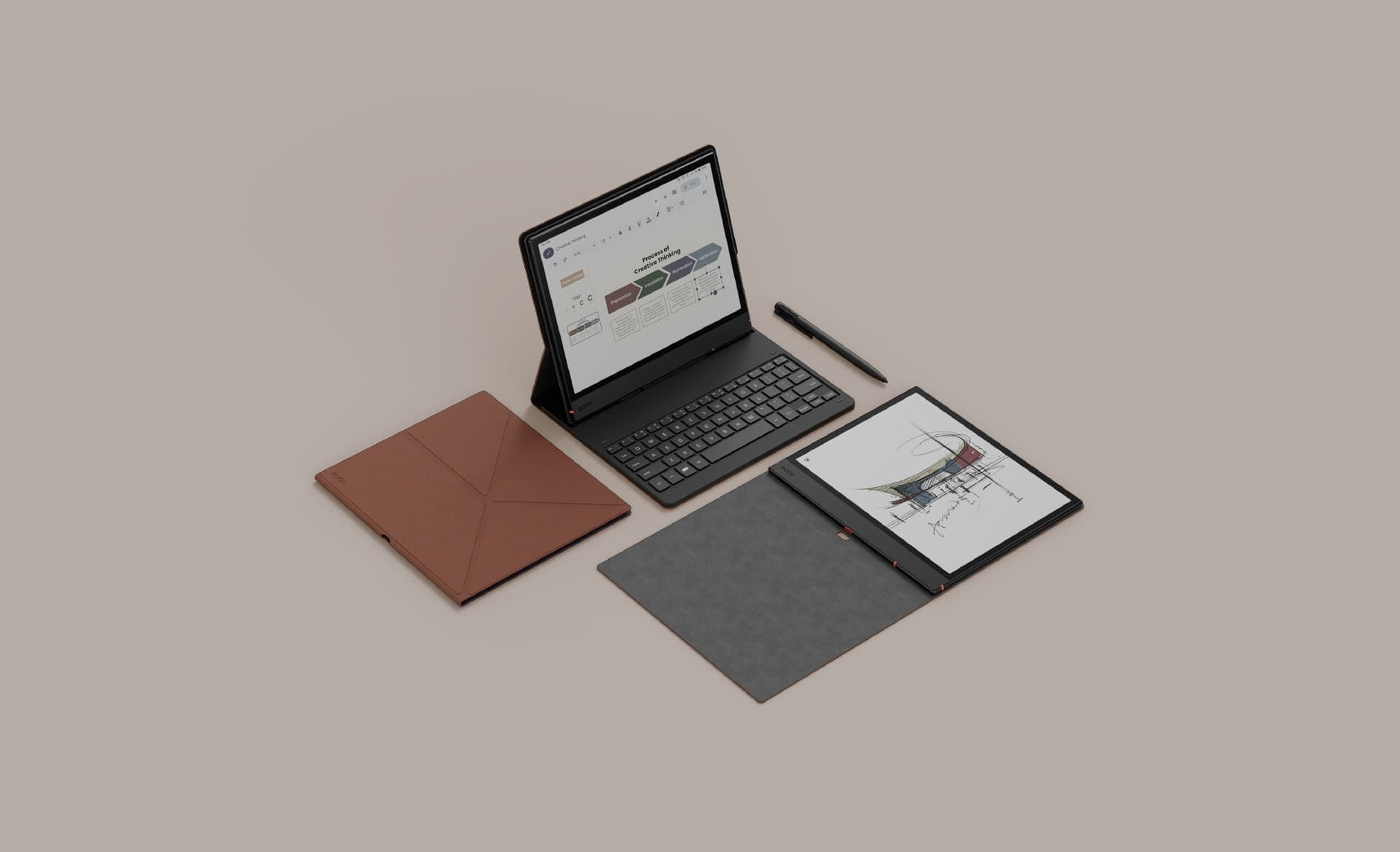
La gamme BOOX Note Air combine les avantages d'un carnet numérique, d'une liseuse E Ink couleur et d'une tablette Android. Avec leur écran de 10,3 pouces, leur stylet sensible à la pression et leurs nombreuses fonctions de lecture et de prise de notes, les Note Air sont conçus pour les étudiants, chercheurs, enseignants, professionnels et créateurs qui travaillent quotidiennement avec des documents numériques.
Les BOOX Note Air4 C, Note Air5 C et Note Air6 C partagent une même philosophie : proposer une grande surface d'écriture et de lecture avec un écran E Ink Kaleido 3 couleur, tout en conservant la flexibilité d'Android et des applications tierces.
Au fil des générations, BOOX a principalement fait évoluer les performances, le système Android, l'expérience d'écriture, le rafraîchissement de l'écran et les outils destinés à la productivité et à l'étude.
Dans ce guide, nous comparons les trois générations afin de comprendre leurs différences et leurs caractéristiques communes.
À retenir : le Note Air4 C fonctionne sous Android 13, le Note Air5 C sous Android 15 et le Note Air6 C sous Android 16. Les trois modèles disposent de 6 Go de RAM, 64 Go de stockage, d'un écran Kaleido 3 de 10,3 pouces et d'une batterie de 3 700 mAh. Le Note Air6 C ajoute notamment un processeur octa-core gravé en 4 nm et le Bluetooth 6.0.
Les trois modèles BOOX Note Air
| Modèle | Écran | RAM / Stockage | Système | Batterie | Poids |
|---|---|---|---|---|---|
| BOOX Note Air4 C | 10,3" Kaleido 3 | 6 Go / 64 Go | Android 13 | 3 700 mAh | ~420 g |
| BOOX Note Air5 C | 10,3" Kaleido 3 | 6 Go / 64 Go | Android 15 | 3 700 mAh | ~440 g |
| BOOX Note Air6 C | 10,3" Kaleido 3 | 6 Go / 64 Go | Android 16 | 3 700 mAh | ~440 g |
Les trois modèles utilisent un écran couleur E Ink Kaleido 3 capable d'afficher jusqu'à 4 096 couleurs, avec une résolution de 300 ppp en noir et blanc et 150 ppp en couleur.
Ils disposent également d'un éclairage frontal réglable, d'un écran tactile, d'un stylet compatible avec 4 096 niveaux de pression, d'un emplacement microSD et du Google Play Store.
Qu'est-ce que la gamme BOOX Note Air ?
La gamme BOOX Note Air se situe à mi-chemin entre la tablette Android traditionnelle, la liseuse électronique et le carnet numérique.
L'objectif n'est pas de remplacer un ordinateur portable ou une tablette LCD dans tous les usages. Les Note Air sont plutôt conçus pour offrir une expérience particulièrement adaptée à la lecture, à l'écriture manuscrite et au travail sur documents.
Ils peuvent notamment être utilisés pour :
- lire des livres numériques ;
- lire et annoter des PDF ;
- prendre des notes manuscrites ;
- suivre des cours ;
- préparer des réunions ;
- étudier des articles scientifiques ;
- annoter des documents professionnels ;
- réaliser des croquis et schémas ;
- consulter des graphiques et présentations ;
- utiliser des applications Android compatibles E Ink ;
- synchroniser des documents et des notes.
Le format de 10,3 pouces offre une surface suffisamment grande pour travailler confortablement sur des PDF, des documents professionnels, des présentations et des notes manuscrites.
Pourquoi choisir un écran E Ink couleur ?
Les trois générations utilisent la technologie E Ink Kaleido 3.
Contrairement à une dalle LCD ou OLED traditionnelle, l'affichage E Ink est conçu pour reproduire une expérience de lecture plus proche du papier. Les couleurs permettent notamment de mieux exploiter les documents contenant des graphiques, des schémas, des annotations ou des illustrations.
La couleur peut être particulièrement utile pour :
- les graphiques ;
- les tableaux ;
- les cartes mentales ;
- les schémas techniques ;
- les annotations ;
- les documents pédagogiques ;
- les bandes dessinées ;
- les illustrations ;
- les présentations professionnelles.
Il faut toutefois garder à l'esprit qu'un écran E Ink couleur ne cherche pas à reproduire la luminosité et la saturation d'un écran LCD ou OLED. La technologie privilégie la lecture et l'écriture plutôt que la consommation de contenus multimédias.
BOOX Note Air4 C
Découvrir le BOOX Note Air4 C sur Eink.ma →
Le BOOX Note Air4 C combine un écran E Ink couleur de 10,3 pouces avec Android 13, 6 Go de RAM et 64 Go de stockage.
Ses principales caractéristiques comprennent :
- écran E Ink Kaleido 3 de 10,3 pouces ;
- 4 096 couleurs ;
- résolution de 300 ppp en noir et blanc ;
- résolution de 150 ppp en couleur ;
- 6 Go de RAM ;
- 64 Go de stockage ;
- Android 13 ;
- processeur octa-core avec BOOX Super Refresh Technology ;
- Wi-Fi ;
- Bluetooth 5.1 ;
- batterie de 3 700 mAh ;
- microSD ;
- haut-parleurs stéréo ;
- microphone ;
- lecteur d'empreintes digitales ;
- éclairage frontal chaud et froid ;
- stylet BOOX Pen Plus.
Une expérience pensée pour la prise de notes
Le Note Air4 C propose un ensemble complet d'outils pour écrire, dessiner et organiser ses notes.
L'application Notes prend notamment en charge différents modèles de pages, pinceaux, calques, outils de forme, lasso, dossiers, tags et fonctions d'organisation.
Le système prend également en charge le multitâche avec la possibilité d'utiliser le mode écran partagé.
Lecture et annotation de documents
Avec NeoReader, le Note Air4 C peut lire et annoter de nombreux formats de documents.
Il est notamment compatible avec les PDF, EPUB, DOC, DOCX, PPT, PPTX, TXT, MOBI, AZW3, CBZ, CBR et plusieurs autres formats.
Le mode écran partagé permet également de lire un document tout en prenant des notes.
Android et applications
Le Note Air4 C utilise Android 13 et dispose du Google Play Store.
Il est donc possible d'installer des applications Android compatibles pour la lecture, le stockage cloud, la communication ou la productivité.
Format et mobilité
Le Note Air4 C mesure environ 226 × 193 × 5,8 mm et pèse environ 420 g.
Son format reste suffisamment compact pour être transporté quotidiennement tout en offrant une surface de travail de 10,3 pouces.
BOOX Note Air5 C
Découvrir le BOOX Note Air5 C sur Eink.ma →
Le BOOX Note Air5 C conserve le format 10,3 pouces et l'écran Kaleido 3 du Note Air4 C, mais apporte plusieurs évolutions importantes au niveau du logiciel, de l'expérience d'écriture et de la productivité.
Ses principales caractéristiques comprennent :
- écran E Ink Kaleido 3 de 10,3 pouces ;
- 4 096 couleurs ;
- 300 ppp en noir et blanc ;
- 150 ppp en couleur ;
- 6 Go de RAM ;
- 64 Go de stockage ;
- Android 15 ;
- processeur octa-core ;
- BOOX Super Refresh Technology ;
- Wi-Fi ;
- Bluetooth 5.1 ;
- batterie de 3 700 mAh ;
- microSD ;
- éclairage frontal réglable ;
- lecteur d'empreintes digitales ;
- stylet BOOX Pen3 ;
- compatibilité avec le clavier magnétique BOOX.
Android 15
L'une des évolutions les plus visibles du Note Air5 C est son passage à Android 15.
Le Google Play Store permet d'installer des applications tierces, tandis que l'interface BOOX conserve une expérience adaptée à l'utilisation d'un écran E Ink.
Une expérience d'écriture améliorée
Le Note Air5 C est livré avec le BOOX Pen3.
Le stylet offre :
- 4 096 niveaux de pression ;
- détection de l'inclinaison ;
- faible latence ;
- une expérience d'écriture conçue pour offrir davantage de friction et de résistance.
BOOX a également amélioré la texture de la surface d'écriture afin de se rapprocher davantage de la sensation d'un stylo sur papier.
Un appareil plus adapté à la productivité
Le Note Air5 C peut être utilisé avec le BOOX Magnetic Keyboard Cover.
Le clavier se connecte via les broches pogo et permet notamment de :
- rédiger des e-mails ;
- écrire de courts rapports ;
- modifier des documents ;
- travailler sur des présentations ;
- effectuer des tâches bureautiques légères.
Le clavier dispose également d'un port USB-C permettant la recharge pass-through.
Smooth Refresh
Le Note Air5 C introduit un mode Smooth Refresh destiné à améliorer la fluidité de l'affichage E Ink.
BOOX indique que ce mode optimise les algorithmes de rafraîchissement et le déghosting afin d'améliorer la navigation, le défilement et certaines utilisations plus dynamiques.
Il reste néanmoins important de rappeler qu'un écran E Ink ne fonctionne pas comme un écran LCD ou OLED traditionnel.
BOOX Note Air6 C
Découvrir le BOOX Note Air6 C sur Eink.ma →
Le BOOX Note Air6 C représente la génération la plus récente de cette comparaison.
Il conserve le format 10,3 pouces et l'écran Kaleido 3, mais fait évoluer la plateforme avec Android 16, un processeur octa-core amélioré et de nouvelles fonctions destinées notamment à l'étude, à la recherche et à l'organisation des connaissances.
Ses principales caractéristiques comprennent :
- écran E Ink Kaleido 3 de 10,3 pouces ;
- 4 096 couleurs ;
- 300 ppp en noir et blanc ;
- 150 ppp en couleur ;
- 6 Go de RAM ;
- 64 Go de stockage ;
- Android 16 ;
- processeur octa-core amélioré ;
- architecture CPU en 4 nm ;
- BOOX Super Refresh Technology ;
- Wi-Fi ;
- Bluetooth 6.0 ;
- batterie de 3 700 mAh ;
- microSD ;
- éclairage frontal chaud et froid ;
- lecteur d'empreintes digitales ;
- stylet BOOX Pen3 ;
- compatibilité avec le clavier magnétique BOOX.
Android 16
Le Note Air6 C fonctionne sous Android 16 et dispose du Google Play Store.
Cette plateforme permet d'utiliser des applications tierces pour l'étude, la lecture, le stockage cloud et la productivité.
Processeur octa-core 4 nm
BOOX indique que le Note Air6 C utilise un processeur octa-core amélioré basé sur un procédé de fabrication 4 nm.
L'objectif est notamment d'améliorer la réactivité générale de l'appareil et de mieux gérer les applications et tâches multitâches.
Des fonctions davantage orientées étude et recherche
Le Note Air6 C ajoute plusieurs outils destinés aux utilisateurs qui travaillent régulièrement avec des documents et des informations.
Parmi les fonctionnalités mises en avant par BOOX :
- Dual Notes ;
- Calendar Memo ;
- EinkWise Code ;
- intégration avec Google Drive ;
- intégration avec Readwise ;
- intégration avec Zotero ;
- BOOXDrop ;
- synchronisation cloud ;
- outils avancés d'annotation et de lecture.
Le Note Air6 C peut ainsi être utilisé comme un véritable espace de travail numérique pour la lecture, la prise de notes et l'organisation des connaissances.
Bluetooth 6.0
Le Note Air6 C passe au Bluetooth 6.0, alors que les Note Air4 C et Note Air5 C utilisent le Bluetooth 5.1.
Cette évolution concerne principalement la connectivité sans modifier le concept général de la gamme Note Air.
BOOX Note Air4 C vs Note Air5 C vs Note Air6 C : comparaison technique
| Caractéristique | Note Air4 C | Note Air5 C | Note Air6 C |
|---|---|---|---|
| Écran | 10,3" Kaleido 3 | 10,3" Kaleido 3 | 10,3" Kaleido 3 |
| Couleurs | 4 096 | 4 096 | 4 096 |
| Résolution N&B | 300 ppp | 300 ppp | 300 ppp |
| Résolution couleur | 150 ppp | 150 ppp | 150 ppp |
| RAM | 6 Go | 6 Go | 6 Go |
| Stockage | 64 Go | 64 Go | 64 Go |
| microSD | Oui | Oui | Oui |
| Système | Android 13 | Android 15 | Android 16 |
| CPU | Octa-core + BSR | Octa-core + BSR | Octa-core amélioré + BSR |
| Architecture CPU | Non précisée | Non précisée | 4 nm |
| Bluetooth | 5.1 | 5.1 | 6.0 |
| Wi-Fi | Oui | Oui | Oui |
| Éclairage frontal | Chaud + froid | Chaud + froid | Chaud + froid |
| Stylet | Pen Plus | Pen3 | Pen3 |
| Pression du stylet | 4 096 niveaux | 4 096 niveaux | 4 096 niveaux |
| Sensibilité à l'inclinaison | — | Oui | Oui |
| Clavier magnétique | Compatible | Compatible | Compatible |
| Haut-parleurs | 2 | 2 | 2 |
| Microphone | Oui | Oui | Oui |
| Empreinte digitale | Oui | Oui | Oui |
| Rotation automatique | Oui | Oui | Oui |
| Batterie | 3 700 mAh | 3 700 mAh | 3 700 mAh |
| Épaisseur | 5,8 mm | 5,8 mm | 5,8 mm |
| Poids | ~420 g | ~440 g | ~440 g |
Les principales différences entre les trois générations
1. L'écran reste très similaire
Les trois appareils utilisent un écran Kaleido 3 de 10,3 pouces.
La résolution reste de :
- 2480 × 1860 en noir et blanc ;
- 300 ppp en noir et blanc ;
- 1240 × 930 en couleur ;
- 150 ppp en couleur ;
- jusqu'à 4 096 couleurs.
La différence entre les générations se situe donc moins au niveau de la résolution que dans les performances, le logiciel et les fonctions supplémentaires.
2. Android évolue rapidement
| Modèle | Version Android |
|---|---|
| Note Air4 C | Android 13 |
| Note Air5 C | Android 15 |
| Note Air6 C | Android 16 |
Pour les utilisateurs qui dépendent fortement des applications Android, la génération logicielle peut être un élément important à prendre en compte.
3. Le stylet évolue
Le Note Air4 C utilise le Pen Plus, tandis que les Note Air5 C et Note Air6 C utilisent le Pen3.
Le Pen3 ajoute notamment la sensibilité à l'inclinaison et une expérience d'écriture améliorée.
4. Les performances évoluent
Les trois modèles disposent de 6 Go de RAM et de la technologie BOOX Super Refresh.
Le Note Air6 C ajoute toutefois un processeur octa-core amélioré fabriqué selon un procédé 4 nm.
5. La connectivité évolue
Le Note Air4 C et le Note Air5 C utilisent le Bluetooth 5.1.
Le Note Air6 C passe au Bluetooth 6.0.
6. Les fonctions de productivité deviennent plus nombreuses
La gamme évolue progressivement d'un carnet numérique avancé vers un appareil davantage orienté lecture + prise de notes + applications + recherche + organisation des connaissances.
Note Air4 C vs Note Air5 C
Le passage du Note Air4 C au Note Air5 C ne change pas fondamentalement le format de l'appareil.
Les deux modèles partagent notamment :
- écran 10,3 pouces Kaleido 3 ;
- 6 Go de RAM ;
- 64 Go de stockage ;
- batterie 3 700 mAh ;
- Bluetooth 5.1 ;
- microSD ;
- éclairage frontal ;
- processeur octa-core ;
- BOOX Super Refresh Technology.
Le Note Air5 C apporte cependant plusieurs évolutions :
- Android 15 ;
- Pen3 ;
- sensibilité à l'inclinaison du stylet ;
- nouvelle texture d'écriture ;
- Smooth Refresh ;
- meilleure intégration du clavier ;
- nouvelles fonctions logicielles.
Pour un utilisateur qui possède déjà un Note Air4 C, l'intérêt d'une évolution dépend donc principalement de l'utilisation recherchée et des nouvelles fonctions dont il souhaite bénéficier.
Note Air5 C vs Note Air6 C
Le Note Air5 C et le Note Air6 C partagent une plateforme très proche :
- écran 10,3 pouces Kaleido 3 ;
- 6 Go de RAM ;
- 64 Go de stockage ;
- batterie 3 700 mAh ;
- 5,8 mm d'épaisseur ;
- environ 440 g ;
- Pen3 ;
- clavier magnétique ;
- microSD.
Le Note Air6 C apporte principalement :
- Android 16 ;
- processeur octa-core amélioré ;
- architecture CPU 4 nm ;
- Bluetooth 6.0 ;
- nouvelles fonctions de lecture et d'étude ;
- intégrations supplémentaires avec des services comme Google Drive, Readwise et Zotero ;
- Calendar Memo ;
- nouvelles fonctions d'organisation des connaissances.
Quel BOOX Note Air pour quel usage ?
Pour lire des PDF et des livres
Les trois modèles disposent du même format d'écran de 10,3 pouces et de la technologie Kaleido 3.
Ils conviennent donc particulièrement aux utilisateurs qui lisent régulièrement :
- PDF ;
- livres numériques ;
- documents professionnels ;
- articles scientifiques ;
- présentations ;
- rapports.
Pour les études
La gamme Note Air est particulièrement adaptée aux étudiants et chercheurs qui combinent lecture et prise de notes.
Le format 10,3 pouces permet de consulter des documents tout en conservant suffisamment d'espace pour les annotations.
Le Note Air6 C ajoute plusieurs outils destinés à l'organisation des connaissances et aux workflows de recherche.
Pour les enseignants
Un Note Air peut servir à :
- préparer des cours ;
- annoter des supports pédagogiques ;
- corriger des documents ;
- prendre des notes ;
- préparer des présentations ;
- consulter des PDF ;
- organiser des ressources pédagogiques.
Pour le dessin et les croquis
Les trois générations prennent en charge un stylet sensible à la pression.
Les Note Air5 C et Note Air6 C utilisent le Pen3 avec sensibilité à l'inclinaison.
Pour les professionnels
Les Note Air peuvent être utilisés pour :
- réunions ;
- comptes rendus ;
- contrats ;
- rapports ;
- brainstorming ;
- annotation de documents ;
- lecture de présentations ;
- consultation de tableaux.
La compatibilité avec le clavier magnétique ajoute également une possibilité de saisie au clavier pour les tâches de rédaction légère.
Pour remplacer une tablette classique
Un Note Air ne cherche pas à remplacer complètement une tablette LCD ou OLED.
Android permet d'utiliser des applications, mais l'écran E Ink reste particulièrement adapté à la lecture, à l'écriture et aux documents.
Pour les jeux rapides, le montage vidéo, la vidéo haute fréquence d'images ou les applications nécessitant des animations très fluides, une tablette traditionnelle reste plus adaptée.
Les points communs de la gamme BOOX Note Air
Écran couleur 10,3 pouces
Le format offre un bon compromis entre mobilité et surface de travail.
Technologie E Ink Kaleido 3
L'écran combine une résolution élevée pour le noir et blanc avec l'affichage de couleurs pour les graphiques, annotations et documents illustrés.
Stylet sensible à la pression
Les trois générations prennent en charge 4 096 niveaux de pression.
Éclairage frontal réglable
L'éclairage permet d'ajuster la luminosité et la température de couleur selon les conditions d'utilisation.
Android et Google Play Store
Les trois modèles permettent l'installation d'applications Android compatibles.
Stockage extensible
Les appareils disposent d'un emplacement microSD.
BOOX Super Refresh Technology
La technologie BSR est conçue pour améliorer le rafraîchissement et réduire le ghosting sur les appareils E Ink compatibles.
Synchronisation et transfert
BOOX propose BOOXDrop pour transférer des fichiers entre l'appareil et un ordinateur ou un smartphone.
Les notes et annotations peuvent également être synchronisées avec les services cloud compatibles.
BOOX Note Air : une tablette E Ink orientée lecture et écriture
La principale différence entre un Note Air et une tablette classique est l'expérience offerte par l'écran E Ink.
Un iPad ou une tablette Android traditionnelle est conçue pour les applications, la vidéo, les jeux et le multimédia.
Le Note Air met davantage l'accent sur :
Lire → annoter → écrire → rechercher → organiser → synchroniser.
Cette approche convient particulièrement aux utilisateurs qui travaillent quotidiennement avec des documents numériques et qui souhaitent réunir leurs livres, PDF et carnets dans un seul appareil.
Formats de fichiers pris en charge
BOOX indique la prise en charge de nombreux formats de documents.
Parmi eux :
- EPUB
- EPUB3
- AZW3
- MOBI
- TXT
- DOC
- DOCX
- PPT
- PPTX
- DJVU
- CBR
- CBZ
- HTML
- RTF
- ZIP
- PRC
- FB2
- CHM
Les appareils prennent également en charge plusieurs formats d'image et audio.
Cloud, synchronisation et applications
Les appareils BOOX peuvent utiliser différentes applications Android et différents services cloud.
BOOX fournit également 10 Go de stockage Onyx Cloud gratuit pour les utilisateurs.
BOOXDrop permet de transférer des fichiers entre le Note Air, un ordinateur et un smartphone.
Le Note Air6 C met particulièrement en avant les intégrations avec Google Drive, Readwise et Zotero, ainsi que des outils destinés à la recherche et à l'organisation des informations.
Design et mobilité
Les trois modèles conservent une épaisseur de 5,8 mm.
Le Note Air4 C pèse environ 420 g, tandis que les Note Air5 C et Note Air6 C pèsent environ 440 g.
Le format 10,3 pouces offre ainsi une surface de travail importante tout en restant suffisamment compact pour être transporté dans un sac.
Comparatif rapide
| Fonction | Note Air4 C | Note Air5 C | Note Air6 C |
|---|---|---|---|
| Écran E Ink couleur | ✓ | ✓ | ✓ |
| Écran 10,3 pouces | ✓ | ✓ | ✓ |
| Kaleido 3 | ✓ | ✓ | ✓ |
| Lecture PDF | ✓ | ✓ | ✓ |
| Prise de notes | ✓ | ✓ | ✓ |
| Dessin | ✓ | ✓ | ✓ |
| Android | ✓ | ✓ | ✓ |
| Google Play Store | ✓ | ✓ | ✓ |
| microSD | ✓ | ✓ | ✓ |
| Clavier magnétique | ✓ | ✓ | ✓ |
| Pen3 | — | ✓ | ✓ |
| Android 15 | — | ✓ | — |
| Android 16 | — | — | ✓ |
| Bluetooth 6.0 | — | — | ✓ |
| CPU 4 nm | — | — | ✓ |
| Fonctions avancées de recherche | — | — | ✓ |
FAQ — BOOX Note Air
Le BOOX Note Air est-il une tablette Android ?
Oui. Les Note Air utilisent Android et prennent en charge les applications tierces via le Google Play Store. Leur écran E Ink les destine cependant particulièrement à la lecture, à l'écriture, aux documents et à la productivité.
Quelle est la différence entre le Note Air4 C et le Note Air5 C ?
Les deux modèles utilisent un écran Kaleido 3 de 10,3 pouces, 6 Go de RAM, 64 Go de stockage et une batterie de 3 700 mAh.
Le Note Air5 C apporte notamment Android 15, le Pen3, une nouvelle expérience d'écriture, Smooth Refresh et une intégration plus poussée du clavier.
Quelle est la différence entre le Note Air5 C et le Note Air6 C ?
Le Note Air6 C passe à Android 16 et utilise un processeur octa-core amélioré basé sur une architecture 4 nm. Il ajoute également le Bluetooth 6.0 et plusieurs fonctions destinées à l'étude, à la recherche et à l'organisation des connaissances.
Les BOOX Note Air ont-ils un écran couleur ?
Oui. Les trois modèles utilisent la technologie E Ink Kaleido 3 avec jusqu'à 4 096 couleurs.
Peut-on installer Google Play sur les Note Air ?
Oui. Les trois modèles disposent du Google Play Store intégré.
Peut-on annoter un PDF avec un BOOX Note Air ?
Oui. NeoReader permet de lire, annoter et marquer des documents compatibles, notamment les PDF.
Peut-on utiliser un clavier avec un BOOX Note Air ?
Oui. Les Note Air4 C, Note Air5 C et Note Air6 C prennent en charge le clavier magnétique BOOX compatible.
Quelle est l'autonomie d'un BOOX Note Air ?
L'autonomie réelle dépend fortement de l'utilisation, notamment du niveau d'éclairage frontal, du Wi-Fi, du Bluetooth, des applications utilisées et de la fréquence de rafraîchissement. BOOX ne donne pas une durée unique applicable à tous les scénarios.
Conclusion
La gamme BOOX Note Air évolue progressivement tout en conservant son concept principal : proposer une grande surface E Ink couleur destinée à la lecture, à l'écriture manuscrite et au travail sur documents.
Le Note Air4 C repose sur Android 13 et propose déjà une plateforme complète avec 6 Go de RAM, 64 Go de stockage, Kaleido 3 et les outils avancés de BOOX.
Le Note Air5 C fait évoluer l'expérience avec Android 15, le Pen3, une nouvelle texture d'écriture, Smooth Refresh et une utilisation plus poussée avec le clavier.
Le Note Air6 C poursuit cette évolution avec Android 16, un processeur 4 nm amélioré, Bluetooth 6.0 et davantage d'outils orientés vers l'étude, la recherche et l'organisation des connaissances.
Les trois modèles conservent cependant une base commune importante : écran 10,3 pouces Kaleido 3, 6 Go de RAM, 64 Go de stockage, batterie 3 700 mAh et expérience E Ink couleur.
Découvrez la gamme BOOX Note Air sur Eink.ma
Découvrez également les autres appareils BOOX, reMarkable, Supernote et Kindle disponibles sur Eink.ma.
Sources officielles
Inscrivez-vous et recevez votre code par e-mail. Ensuite, un e-mail par mois : nouveautés, comparatifs et conseils d'écriture. Rien de plus.